Less than one bit per pixel
The goal of image & movie compression is to reduce the file size a lot, while keeping the image quality as high as possible. Smaller files use less space to store and less time & energy to send.
A Full High Definition movie without compression can easily be 500GB.
When compressed to 1/25, the file size becomes only 20GB.
500GB will not on one Blu-ray disc, but 20GB will.
When compressed to 1/25, there is on average only 0.96 bit to describe one RGB pixel that normally needs 24 bits. How can this be done?!
Such high compression rate is possible by a combination of two things:
A)
movie data contains lots of similar patterns.
B)
many details can be altered without losing visible image quality, which results in even more similar patterns.
Lossless, Lossy, and Near Lossless
"Lossless" compression is compression without any loss of information. The decompressed image is an exact replica of the original image. The image's information is transformed into more space efficient code.
"Lossy" compression is also done by re-writing the data more space efficient, but also are less important details of the image manipulated or even removed so that much higher compression rates can be achieved.
"Near lossless" is lossy really, but no more than harmful; your should not notice a loss of image quality.
Information
The more 'information' an image has, the harder it is to compress.
The easiest to compress is an image that has no change in it. For example an area of 16*16 = 256 pixels, that is exactly the same as that same area in the previous frame. You'll only need to code and store this information: "relative to the same area in the previous frame, nothing has changed".
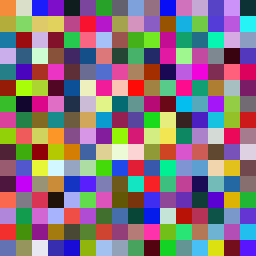
The hardest to compress is an image where each pixel has a unique color, and in random order. The amount of possible combinations of 256 grayscale pixels is: (256!) =
85781777534284265411908227168123262515778152027948561985965
56503772694525531475893774402913604514084503758853423365843
06157196834693696475322289288497426025679637332563368786442
67520762679456018796886797152114330770207752664645146470918
73261008328763257028189807736717814541702505230186084953190
68138257481070252817559459476987034665712738139286205234756
80821886070120361108315209350194743710910172696826286160626
36624350228409441914084246159360000000000000000000000000000
00000000000000000000000000000000000
Random data is almost impossible to compress lossless.
|
|
 |
|
|
|
Simple
No change
Easy to compress |
|
Complex
Random change
Hard to compress |
Although some images or parts of images can be of the extreme, most image and movie data is somewhere in between no-change and random-change. But the majority of the images aren't of average complexity. In the complete image space, ordered from simple to complex, most images are near the simple side of the spectrum. Most pixels combinations are what we call noise. Way more than 50% of the image space is noise, more than 99%, more than 99.99999999 ... Really; most combinations are noise, while we want to only store images.
Almost all frames of a movie are unique, but there are many similarities to be found within one frame, and a whole lot of similarities relative to the other frames of the same movie.
===edited upto here
Relative
It can be rewarding to mainly use relative values. A perfect example:
024, 026, 028, 030, 032, 034
made relative:
024, +2, +2, +2, +2, +2
and even shorter:
024, 5x +2
Problem with relative data, is that when one value is lost, all the following values are unknown.
It's not just the value of a pixel relative to its previous pixel. To start with; it's more efficient to grab a large part of an image, and find the best match to make it relative to.
Relative options:
Relative to a similar part in the same frame
Relative to a similar part in an other frame
Relative to a similar part in a library of common parts
Relative to a similar part somewhere, but: turned, mirrored, scaled, warped, color adjusted, blurred, whatever works.
Repetitions
Pure repetitions are rare, but when they happen, high compression can be achieved.
255, 255, 255, 255, 255, 255, 255, 254, 254, 254, 254.
These are a couple of pixels that "run" (repeat more than once), and can be coded with "run-length encoding" like this:
7 255 4 -1
(7 times value 255, then 4 times a value that is 1 less than the previous value 255)
Prediction
Finish this: "it ain't what you do, --- --- --- ---- --- -- --".
or this: 2, 4, 8, --, --, --, ---.
or correct this: "Cna yuo raed tihs, or is ti ralely ipmsoislbe?"
If the decoding software can predict the values of the next group of pixels exactly right, then it's not necessary to write anything down. If the software can't predict it exactly, a certain amount of correction can guide it in the right direction. The better the software the less correction is needed. Question is how correct the guess needs to be. If the result isn't exact but looks really good and true to the original, then that's good enough for a movie.
Remove noise
Noise is not what we want in an image, and also is noise really hard to compress, because of its random character. Good noise reduction software do not only improve image quality, but also make the file much easier to compress. If a lot of noise is removed, the file becomes not just a few % smaller, more likely is 40%!
The art of noise reduction is to separate the noise from the image. Bad filters also remove important details, make everything look like plastic.
Images, not numbers.
We should not be focusing on exact values too much, because we are trying to compress an movie, not numbers, it may be a little bit lossy. It doesn't matter if the compressed movie isn't an exact copy of the original, as long as it looks really good and true to the original.
====
Index
There are 2^24 = 16777216 possible colors (for ordinary 8 bits/channel RGB pixels).
There are 2^48 = 281474976710656 possible combinations of two pixels.
There are 2^96 = 79228162514264337593543950336 possible combinations of four RGB pixels.
And so on.
But in a movie, it's not likely that all colors and combinations of colors will appear, and it's also likely that the amount of combinations of just a few pixels is already larger than can possibly fit in this one movie.
In this one-hour movie for example, fit only 2332800000 groups of four pixels.
In an index, only the ones who appear get a code. The ones that appear most often get a short code and the rare ones a longer one.
The index can become quiet large, which is a problem because it has to be saved also. That's why the index must be compressed too.
Groups get discount
When the goal is 0.0078 bpp, you may -on average- not spend even 1 bit per pixel, not even 1/100 bit!
16x16 RGB pixels are 6144 bits, thus have 2^6144 combinations, but at 1/128 file size you'll have only 48 bits left, thus 2^48 = 281474976710656 possible options to address, which is a lot, but next to nothing compared to 2^6144.
The larger the group that can get a "global treat" (one treatment for all), the less bits you have to spend.
Less combinations & relative values
There are so many possible combinations of groups of pixels, that about zero combinations will appear more than once, within one movie.
But the amount of pixel-groups that aren't exactly equal but very similar to other groups, is pretty large. If you compare groups and may use: scaling, turning, and other global twists, than extremely more similarities arise. Within one frame some similarities can be found, but extremely good matches can be found when allowed to compare within any frame of a film, or even somewhere else!
When the most ideal match if found, one only has to note where to compare to and what the difference is. The code of difference (relative values) can also be compared to other codes of difference, and on and on, possible until the difference is equal to zero (or almost). The final code could exist mainly out of directions; where to compare with.
A crude method of creating less combinations is by reducing the amount of colors, but even when using diffusion dither and picking especially the less visible tones, the result isn't great. 8 bits = 256 tones, minus two bits is 64 tones. Little loss of bits and a lot of loss in image quality.
The less combinations and lower relative values, the higher compression rate can be achieved.
Fixed & Variable code length
Fixed:
0=000000000000000000000000
1=000000000000000000000001
2=000000000000000000000010
3=000000000000000000000011
4=000000000000000000000100
5=000000000000000000000101
6=000000000000000000000110
Variable:
0=0
1=1
2=00
3=01
4=10
5=11
6=000
Clearly; variable is the best option, BUT not the easiest one; you'll need to know how many bits each code is, where does it start, where does it end?
Does: 00011010010001001
mean: 0, 00, 1101, 0, 0, 1, 00, 0, 10, 0, 1.
or maybe?: 00, 01, 101, 0, 01, 0, 001 0, 01.
Some solutions (there are many more):
- Intern. Place a code of for example 4 bits in front of each code, which can tell 16 different code lengths.
- Extern. Same as intern, but out of the main code, and can be compressed separately.
- Separation code. For example could "1111" be the in-between code, and may no other code start or end with "11" or "111", or contain "1111". The good thing of separate, is that if the track is lost; it can be found easily. Also is there no limit on the length of the code. Finally, run-length encoding could remove long separationcode-runs pretty well.
|